What KidneyLove does
Every feature on this page is in the app today. Where a number is an estimate, the app says so on screen, and so does this page.


Swipe for more screens.
Screens from the app. Example days on a test account.
Daily amounts worked out for you
KidneyLove tracks four nutrients: sodium, potassium, phosphorus and protein. During setup it asks for your kidney stage (or the eGFR range from your last blood test), whether you are on dialysis and which kind, your gender, your height, and whether you have high blood pressure, heart failure, nephrotic syndrome or diabetes. From those answers it works out a daily amount for each nutrient.
- Sodium, potassium and phosphorus are shown as daily limits. Which limits apply depends on your stage and conditions; at early stages some nutrients are not restricted at all, and the app says so.
- Protein is worked out from your height and gender. Before dialysis it is shown as a daily range. On dialysis it is shown as a daily minimum, because too little protein costs muscle.
- The starting amounts follow the National Kidney Foundation's KDOQI guideline for nutrition in kidney disease. The app shows that source under the amounts.
- If your care team gave you different numbers, follow theirs. In Settings you can enter a custom daily amount for any nutrient, and KidneyLove uses it from then on. If a custom number is far from the calculated one, the app asks you to double-check it.
- You can change any answer in Settings. Your answers are used to work out your daily amounts and nothing else.
KidneyLove cannot show daily amounts for a kidney transplant, kidney stones or an unknown stage, because it needs a CKD stage to work from. It tells you so rather than guessing.
Logging a meal
Tap the add button on Today and choose how to describe what you ate. Every path ends on the same review screen, and nothing is logged until you confirm it.
Scan it: a photo of the meal
Take a photo or choose one from your library. KidneyLove identifies the foods in it, breaks an assembled dish into its ingredients, and estimates portions. You confirm the amount before the meal can be added. Photo estimates can miss sauces or hidden ingredients, and the app says so on screen.
Speak it: say what you ate
Describe the meal out loud, including amounts if you know them. Speech is turned into text on your phone, and the words are shown to you under "Here's what I heard" before anything else happens. Once you confirm them, they are treated like typed text.
Type it: plain words
Type a meal the way you would say it, for example a bacon cheeseburger, small fries, and a diet cola. KidneyLove works out the foods and portions and shows them for review.
Search foods
Search the food database directly and pick a household portion such as a cup, a slice or a piece. When a food exists in the database its nutrients come from there; when it does not, KidneyLove estimates them and labels the result "Estimate — not from the food database".
Review before it counts
- The review screen shows estimated meal totals and every ingredient. Tap an ingredient to change its amount, add one, remove one, or rename the meal.
- Describe a correction in words, such as "add one slice of cheese", and the list updates.
- Choose the meal (breakfast, lunch, dinner or snack) and the date, then add it.
- Later, edit any logged food: amount, household portion, ingredients, nutrient values, meal or date.
Barcodes and Nutrition Facts labels
Barcode
Point the camera at a packaged food's barcode. KidneyLove looks the product up, shows its nutrients per serving, and lets you set the serving and your portion before adding it to a meal. You can also scan just to look, without logging anything.
- Product data comes from sources including USDA FoodData Central and Open Food Facts. Settings has a Data sources screen that credits them.
- When a nutrient is missing from the product data, the app may show a value estimated from a similar product or calculated from the label's percent daily value, and marks it as such. If it cannot find the product, it says "Product not found".
- The review screen reminds you that nutrition values are estimates and may vary, and asks you to check the package label when something could not be verified.
Food Label
Photograph the Nutrition Facts panel on a package. KidneyLove reads the printed per-serving amounts, asks you to confirm the serving size, and flags anything that needs review. Some labels do not list every nutrient, and phosphorus is often missing; the app shows a missing value as missing rather than inventing one.
Comparing two products
From Foods, or from any barcode result, scan a second packaged food and see the two side by side. For each nutrient KidneyLove marks the lower and the higher amount, per serving or per 100 g. The comparison is between the two products only; it does not grade either against your daily amounts, and it does not tell you which to buy.
Today
Today is the home screen. It adds up everything you have logged and shows each nutrient against your daily amount.
- A Kidney Check card that sums up the day in one short line, such as "Logged sodium is close to your limit".
- A card for each nutrient with how much is left.
- Your foods grouped under Breakfast, Lunch, Dinner and Snack. Copy a food to another meal, or remove it.
- A week strip of day rings so you can look back at recent days.
- When a logged food is missing a nutrition value, Today says the total may be higher rather than hiding the gap.
Trends
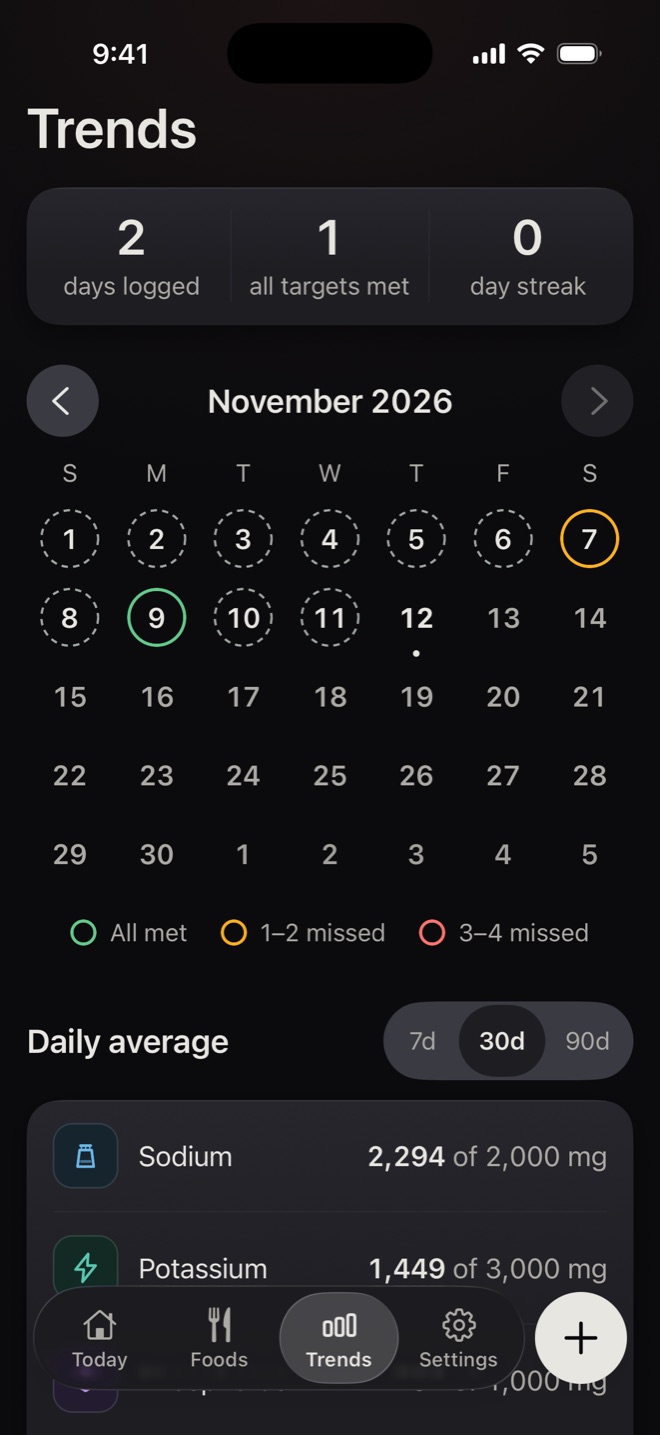
- A month calendar of day rings: green when every daily amount was met, amber when one or two were missed, red when three or four were missed, and grey when a day was only partly logged or not logged at all. "Ring colors explained" in the app spells this out.
- Counts of days logged, days with every amount met, and days logged in a row.
- Daily averages for each nutrient over 7, 30 or 90 days, against your daily amounts.
- Tap a day to see its totals.
Foods, guides and food checks
Check a food against today
Search a food in the Foods tab and KidneyLove compares one portion with what is left of your daily amounts right now. The answer is one of four: yes, a smaller amount (with a suggested portion such as half a cup), not today, or we can't say when a nutrient value is missing. It is arithmetic against your own numbers for today. It is not a rating of whether a food is safe or healthy, and it is not advice.
Food guides
Short guides for each nutrient explain where it tends to show up: sodium in packaged and prepared foods, potassium in portions and ingredients, phosphorus in phosphate additives, and protein as a daily range to understand rather than minimise. The phosphorus guide shows how to spot phosphate additives on an ingredient list.
Grocery guide
A guide organised by grocery category lists foods worth checking, common whole-food examples, and comparisons to consider. The app is explicit that these are foods to check, not foods you must avoid, and that the exact product and portion still matter.
Meal reminders
Optional reminders for Breakfast, Lunch, Dinner and End of Day ("Time to log anything you missed?"). You are offered them during setup. In Settings, under Tracking reminders, each one has its own time and an on/off switch.
Offline use and your data
- Your log is stored in your account, and the last 90 days are also kept on your phone.
- Without a connection you can open Today and Trends and see what is saved on the phone. Adding food needs a connection.
- Meal and label photos are sent to identify food and are not stored by us. A copy stays in the app on your phone until you sign out or delete your account.
- Speech is turned into text on your phone. Only the text you confirm leaves it.
- Signing in uses a six-digit code sent to your email. There are no passwords. You can delete your account and its data from Settings at any time.
The Privacy Policy explains what is collected and who it is shared with.
Accessibility
- Text follows your phone's text size setting, and layouts rearrange rather than clip at large sizes. Body text never drops below 17 points.
- Status is always shown with a word and an icon, never with colour alone.
- Screen-reader labels are written for every control and chart, including a spoken description of the ring calendar and the evidence chart.
- Reduced motion is respected. Dark mode is supported throughout.
What KidneyLove deliberately does not do
- It does not track calories, fluid, weight, blood pressure, medications or lab results.
- It does not rate foods as safe or unsafe, high or low, or give a kidney score. It only compares a portion with your own daily amounts.
- It does not give medical advice, suggest changes to your treatment, or interpret your blood tests. It does not replace your care team.
- It does not include recipes, meal plans, a chatbot, social features, or advertising.
- It does not run on the web. It is an app for iPhone and Android phones.